
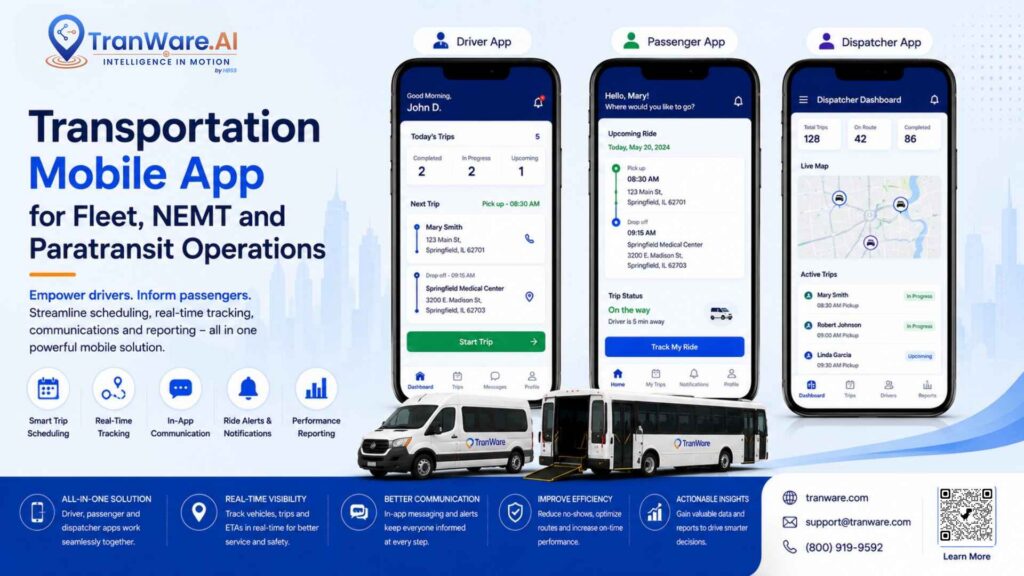
A Transportation Mobile App helps transportation companies connect drivers, dispatchers, vehicles, and riders through one digital workflow. Instead of relying on phone calls, paper records, and disconnected systems, transportation providers can use mobile technology for trip management, GPS tracking, driver communication, payments, notifications, and customer service. This guide explains how transportation mobile apps work, their key benefits, important features, use cases, and what USA transportation providers should consider before choosing a solution.

What Is a Transportation Mobile App?
A Transportation Mobile App is software designed specifically for transportation operations. It can be used on smartphones, tablets, and other mobile devices to give drivers, riders, and transportation teams access to important information while they are away from a desktop computer.
A mobile solution can connect several parts of a transportation business. A rider may request or review a trip, a dispatcher can assign the trip, a driver can receive the trip details, and management can monitor vehicle activity and operational performance.
For transportation providers, the goal is not simply to have a mobile application. The real value comes from connecting the app with scheduling, dispatching, route optimization, GPS tracking, billing, payment processing, and fleet management.

Key Benefits of a Transportation Mobile App
A well-designed Transportation Mobile App can provide several operational benefits.
- Faster communication: Drivers and dispatchers can communicate without relying only on phone calls.
- Better trip visibility: Trip information can be available directly on a driver’s mobile device.
- Improved rider experience: Passengers can receive trip updates and notifications.
- Real-time tracking: GPS integration can provide better visibility into vehicle locations.
- Reduced paperwork: Digital trip information can reduce manual forms and records.
- Simpler payment handling: Mobile payment tools can support faster transactions and electronic receipts.
- Better fleet coordination: Drivers, vehicles, and dispatch teams can work from connected information.
- Improved productivity: Digital workflows can reduce duplicate data entry and unnecessary communication.
Transportation Mobile App Features to Consider
Not every mobile application offers the same capabilities. Transportation companies should evaluate features based on their fleet size, service type, and daily workflow.
1. Driver App for Transportation Companies
A Driver App for Transportation Companies should provide drivers with the information and tools required to complete their work efficiently.
Common features include:
- Trip assignments
- Pickup and drop-off information
- Trip status updates
- Driver-to-dispatch communication
- Navigation
- Passenger information
- Payment processing
- Trip history
- Driver activity records
The interface should be simple because drivers may need to use the application while moving between different trips throughout the day.
2. Rider App for Transportation Services
A Rider App for Transportation Services focuses on passenger convenience and communication.
Depending on the platform, riders may be able to:
- Request or schedule transportation
- View trip information
- Receive pickup notifications
- Track vehicles
- Make payments
- Access electronic receipts
- Review previous trips
For transportation providers, these features can reduce the number of routine calls handled by reservation and dispatch staff.
3. Fleet Management Mobile App
A Fleet Management Mobile App can extend fleet operations beyond the office.
Mobile fleet functionality can help transportation teams manage:
- Vehicle information
- Driver activity
- Vehicle inspections
- Maintenance requirements
- GPS tracking
- Trip activity
- Operational communication
The best results usually occur when mobile fleet tools are connected with broader fleet management software instead of operating as a separate system.
4. GPS Vehicle Tracking
GPS tracking is an important feature for many transportation operations.
A connected mobile platform can help dispatchers understand:
- Where vehicles are located
- Whether a vehicle is moving
- Which trip a vehicle is handling
- Whether a driver is approaching a pickup
- How transportation activity is progressing
Real-time visibility can help dispatchers respond more quickly when trip conditions change.
5. Mobile Payment Processing
Transportation providers may also need mobile payment functionality.
A transportation application can support:
- Card payments
- Digital receipts
- Signature capture
- Payment records
- Driver cashiering
- Transaction tracking
For businesses that collect fares or other transportation-related payments in the field, mobile payment functionality can reduce manual processing.
Transportation Mobile App for NEMT Operations
An NEMT Mobile App can be valuable for Non-Emergency Medical Transportation providers because trips often involve scheduled appointments, specific pickup requirements, recurring transportation, and time-sensitive service.
For example, an NEMT provider may need to coordinate a passenger’s trip from a residence to a medical appointment and then arrange the return journey.
A mobile solution can support:
- Driver trip information
- Pickup and drop-off status
- Passenger communication
- GPS visibility
- Trip documentation
- Dispatch coordination
- Payment processing
- Rider notifications
When connected with NEMT dispatch software, mobile technology can become part of a complete workflow covering reservations, scheduling, dispatching, routing, tracking, and billing.
Paratransit Mobile App for Flexible Transportation
A Paratransit Mobile App can support transportation services where riders may have different mobility requirements and vehicles may have different capabilities.
For example, a dispatcher may need to consider whether a trip requires:
- Wheelchair accessibility
- A vehicle lift
- Specialized equipment
- Specific vehicle capacity
- A particular pickup time
- A specific drop-off requirement
Mobile technology can help drivers access trip information while dispatchers maintain control over the wider operation.
How a Transportation Mobile App Connects With Dispatch Software
Mobile applications are most useful when they connect with transportation management systems.
A typical workflow may look like this:
Rider Request → Scheduling → Dispatch → Route Optimization → Driver App → GPS Tracking → Trip Completion → Billing and Payment
This connected process helps reduce the need to enter the same information into multiple systems.
For example, once a dispatcher assigns a trip, the driver can receive the relevant information on a mobile device. The driver can then update the trip status while the transportation team monitors progress.
Data and Scale
The following figures provide useful context from TranWare’s publicly stated company information. These figures are company-stated information rather than independent industry statistics.
| Metric | Stated Information |
| Transportation technology experience | 25 years |
| Fleet size supported in highlighted solutions | 20 to 1,000+ vehicles |
| Operating sites stated by the organization | 900+ |
| Trips per day stated by the organization | 170,000+ |
| Mobile access | Smartphones, tablets and web-enabled devices |
| Potential mobile functions | Trips, communication, tracking, payments and notifications |
The scale of a transportation provider matters when selecting mobile technology. A small fleet may need basic driver and trip management, while a larger operation may require advanced integrations, GPS tracking, dispatching, billing, reporting, and fleet management.
How Does a Transportation Mobile App Work?

A typical transportation mobile workflow can follow these steps:
Step 1: A Trip Is Requested
A rider, facility, broker, dispatcher, or another authorized user creates a transportation request.
Step 2: The Trip Enters the System
The trip is added to the scheduling and transportation management workflow.
Step 3: The Dispatcher Assigns the Trip
The dispatcher reviews driver, vehicle, time, location, and service requirements.
Step 4: The Driver Receives the Assignment
The driver receives trip information through the mobile application.
Step 5: The Driver Completes the Trip
The driver follows the assigned trip, updates statuses, communicates with dispatch, and navigates to required locations.
Step 6: The System Records Trip Activity
Trip statuses, timestamps, vehicle information, and other operational data can be captured digitally.
Step 7: Payment and Billing Are Completed
Payment information, receipts, billing details, or cashiering records can be processed according to the provider’s workflow.
Requirements for Choosing a Transportation Mobile App
Before selecting a platform, transportation providers should evaluate several factors.
Integration
The mobile application should integrate with:
- Scheduling software
- Dispatching software
- Route optimization
- GPS tracking
- Billing
- Payment processing
- Fleet management
- Customer management
Ease of Use
Drivers should be able to find trip information and update statuses without complicated navigation.
Scalability
Consider the number of vehicles, drivers, trips, and locations you operate today and may operate in the future.
Security
Review:
- User authentication
- Access controls
- Data protection
- Payment security
- Data backups
- Vendor security practices
Reporting
The solution should make useful operational data available to managers.
Customization
Some transportation providers need customized workflows, branding, integrations, reports, or business rules.
Transportation Mobile App vs Manual Transportation Processes
| Capability | Mobile-Based Process | Manual Process |
| Driver communication | Mobile communication | Phone calls |
| Trip details | Digital access | Paper or phone |
| GPS visibility | Real-time capability | Limited |
| Rider notifications | Automated capability | Manual |
| Payments | Mobile processing capability | Manual processing |
| Trip records | Digital | Paper or spreadsheets |
| Navigation | Mobile integration | Separate tools |
| Dispatch connection | Connected workflow | Multiple systems |
The main benefit of mobile technology is not simply replacing paper with an app. The greater advantage is creating a connected workflow where information moves between riders, drivers, dispatchers, vehicles, and management.
Transportation Mobile App and Related Software
A mobile application can become much more useful when integrated with other transportation technologies.
For example:
Transportation Mobile App + NEMT Dispatch Software + Fleet Management Software + GPS Tracking + Route Optimization + Billing
This approach can help transportation companies manage more of their operations through connected digital processes.
Other supporting technologies may include Incident Reporting Software for recording transportation incidents and Transportation Cashiering Software for managing driver-related payment activities.
This is especially important for providers using broader Transport management software, where scheduling, dispatch, billing, fleet operations, and mobile workflows need to share information.
Common Mistakes When Choosing a Transportation Mobile App
1. Choosing a Standalone App
A mobile app that does not connect with your dispatch, fleet, billing, or GPS systems may create another disconnected workflow.
2. Ignoring Driver Usability
An application can have many features but still fail if drivers find it difficult to use.
3. Focusing Only on Software Price
The total cost may include implementation, training, integrations, support, devices, and ongoing maintenance.
4. Forgetting the Rider Experience
Transportation providers should consider both driver and passenger needs.
5. Not Planning for Growth
Choose technology that can handle future increases in vehicles, drivers, trips, and service areas.
Expert Tips for Choosing the Right Transportation Mobile App
- Map your current process first. Identify where your team relies on phone calls, paper, spreadsheets, and duplicate data entry.
- Test with real drivers. Ask drivers to complete realistic trip scenarios before choosing a platform.
- Review integrations. Confirm that the app can connect with dispatch, GPS, routing, billing, and payment systems.
- Measure results. Track metrics such as on-time performance, trip completion, driver productivity, communication volume, and payment processing time.
- Consider the entire ecosystem. A mobile application should support your broader transportation management workflow.
- Ask about scalability. Make sure the system can support your expected fleet and trip growth.
- Request a demonstration. Test actual scheduling, dispatching, driver, rider, tracking, and payment workflows before making a final decision.

Conclusion
A Transportation Mobile App can help transportation providers move from manual, disconnected processes to a more connected digital workflow. For NEMT providers, paratransit agencies, shuttle operators, and fleet businesses across the USA, TranWare provides technology that can connect drivers, riders, dispatchers, and vehicles while improving communication and operational visibility.
The strongest solution is not simply an application with a long list of features. TranWare’s Transportation Mobile App works as part of a broader transportation ecosystem that includes NEMT dispatch software, fleet management software, route optimization, GPS tracking, Incident Reporting Software, Transportation Cashiering Software, billing, and Transport management software.
For transportation organizations planning to modernize their daily operations, TranWare offers a connected approach that brings people, vehicles, trips, and business systems together, helping create a more efficient, scalable, and streamlined transportation workflow.
FAQs About Transportation Mobile Apps
1. What is a Transportation Mobile App?
A Transportation Mobile App is software that helps transportation providers manage trips, drivers, riders, communication, tracking, payments, and other transportation activities through mobile devices.
2. What is a Driver App for Transportation Companies?
It is a mobile application that allows drivers to access trip information, communicate with dispatch, update trip statuses, navigate routes, and complete other transportation tasks.
3. How does an NEMT Mobile App help providers?
An NEMT Mobile App can help providers manage driver communication, trip updates, passenger information, GPS visibility, notifications, and payment activities.
4. What is a Paratransit Mobile App?
A Paratransit Mobile App supports flexible transportation operations by connecting drivers, riders, dispatchers, vehicles, and trip information through mobile technology.
5. Can transportation mobile apps support GPS tracking?
Yes. Mobile transportation solutions can integrate GPS functionality to provide vehicle location and trip visibility.
Interesting Reads:
Best Vehicle Tracking Software: Features, Benefits and Uses in 2026